We have one Mac mini and two people who want to use a local language model on it. That sounds like a solved problem: install Ollama, open a chat window, done. It is a solved problem for one person on one account. For two accounts on the same machine, plus a phone, plus a laptop that has to stay on a corporate VPN, plus an agent running on another laptop, the one-person setup falls apart in small, annoying ways. Two copies of the models. A server that dies when its owner logs out. A chat that is reachable from the couch but not from the train.
This series is about doing it properly: one native Ollama service that both accounts share, a web chat for every device in the house, private remote access, and nothing exposed to the internet. It is also about doing it with an AI assistant at the keyboard, which went well, and about the places where it did not.
This first article is the overview: what we had, what I asked for, what we built, what we deliberately left out, and how the work was done.
What we started with
The machine is a Mac mini with an Apple M6 (12-core GPU), 32 GB of unified memory and a 256 GB SSD, on macOS 27.0.1. Two macOS accounts, one for each person living in the household, both administrators. FileVault is on and stays on. There is no automatic login.
At the very start, I had only installed Ollama as the desktop app, in my account. The app starts its own ollama serve as a login item, listening on localhost port 11434, with the models in my home folder (7.1 GB at the time, one small model). The second account had nothing. The machine was set to sleep after one minute idle and not to restart after a power failure, which are fine defaults for a desktop and wrong for a server.
As a baseline, the small model gemma4:e2b wrote at 134 to 142 tokens per second in that setup. I wanted the shared service to be no slower than that.
What I asked for
I wrote the requirements down before starting, because I was going to have an AI run the setup and I wanted it to have hard constraints rather than my mood. They came to ten lines, and they fall into three groups.
What to build. One Ollama, native on macOS rather than in Docker, with one model directory, used by both accounts. The raw Ollama API stays bound to localhost. Open WebUI and private access over Tailscale come later, and nothing is ever forwarded from the router.
What not to touch. Home directories and credentials stay separate per account. FileVault stays on, automatic login stays off, no directory becomes world-writable, and files unrelated to the job are left alone.
How to work. Before any administrator-level change, explain the exact change and wait for my approval. Do not assume a background service can use the GPU; prove it under the service identity it will actually run as. Keep an installation log and give me a way to roll each step back.
Three of these deserve a closer look.
FileVault and launchd. With FileVault on, system daemons start only after someone unlocks the disk at boot. That is fine, somebody has to unlock it anyway, but it means the service must come up as a system daemon under launchd, not as a login item in one account, or it will only exist while that account is logged in.
Metal under a service identity. Ollama uses the GPU through Metal. A background daemon running as a hidden service account is not a normal GUI user, and I had read enough forum threads about GPU access from daemons to want proof rather than assumption. So "verify inference under the actual service identity" was a requirement, not a nice-to-have.
Approval before admin changes. The assistant was Claude Code, running in a terminal on the Mac mini. It can run commands. I did not want it running sudo on its own judgement. Every administrator change in this project was a numbered script that Claude wrote and explained, and that I ran myself after reading it. More on that below.
What we built
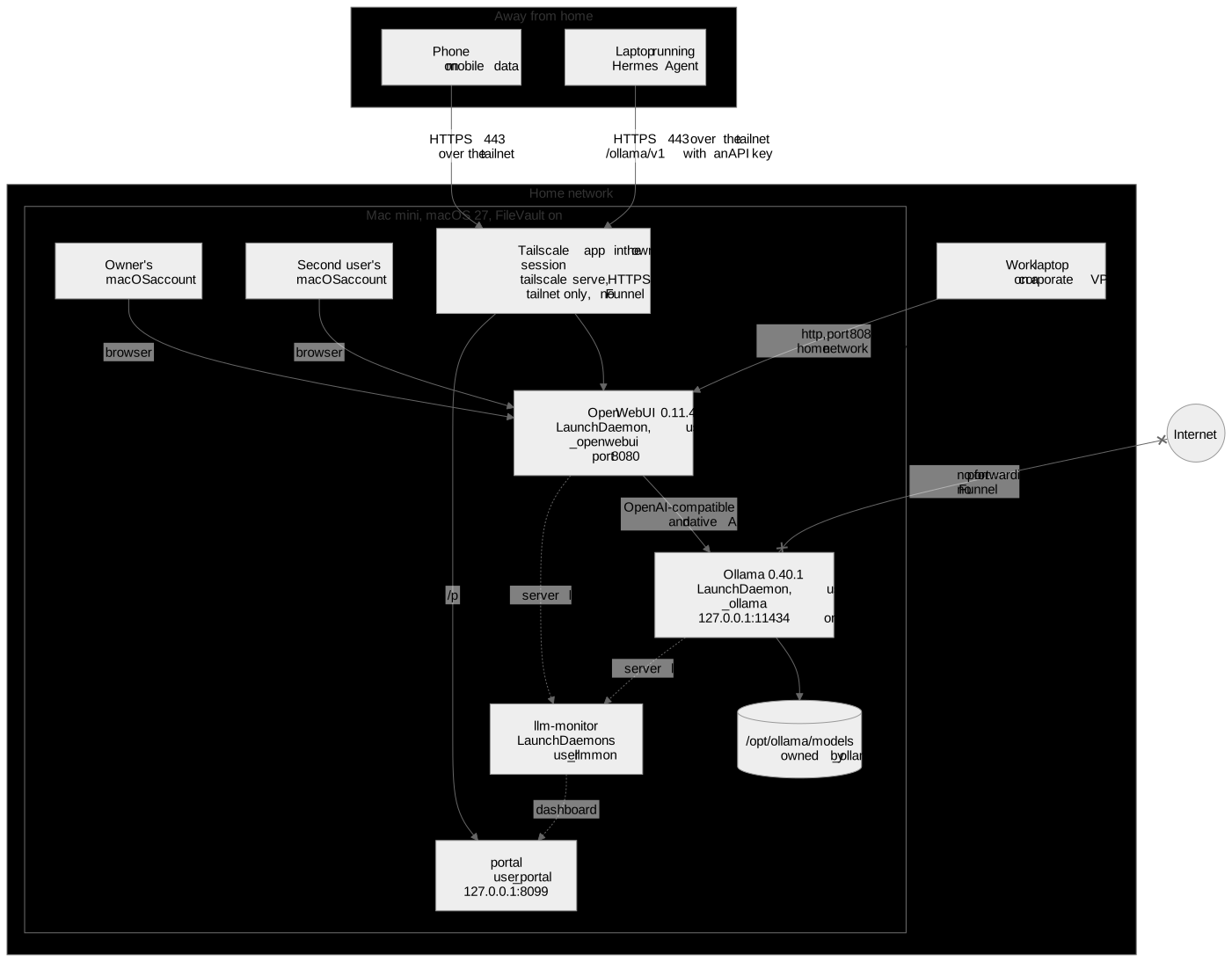
Figure 1. The target architecture. Only Open WebUI is reachable from outside the machine, and only from the home network or the tailnet.
Ollama as a real system service. Ollama 0.40.1 runs as a launchd LaunchDaemon under a hidden service account, _ollama, with its own group, no shell and no login. The models live in /opt/ollama/models, owned by that account and readable by nobody else; ls as a normal user gets "Permission denied", which is the point. The binaries are a root-owned copy of the official release tarball in /opt/ollama/dist/<version>, checksum and code signature verified, not the user-writable app bundle. The API listens on 127.0.0.1:11434 and nowhere else. The service's current settings: one model loaded at a time, a 65,536-token default context, a 12-hour keep-alive, and three parallel slots. The last three arrived later in the story, each as its own stage, and the sixth article in the series explains why.
Open WebUI as a second system service. Open WebUI 0.11.4 runs under its own account, _openwebui, from a virtual environment with 241 hash-pinned packages, on port 8080. Each person has their own Open WebUI login, so chats are private to the person, while the model and the GPU are shared. Several defaults were changed before first start for privacy: admin access to other users' chats, chat export, community sharing, the OpenAI connection and the update check are all off. One might ask why each user could not simply install their own Open WebUI. Two installs would mean two copies of a 1.9 GB environment, two sets of settings to keep aligned, and a service that again depends on who is logged in. One shared service won.
Four ways in, one way blocked.
- Both macOS accounts use the browser on the machine itself.
- My partner's work laptop must stay on its corporate VPN, where a personal VPN is not an option. For it, Open WebUI also listens on the home network. The raw Ollama port does not: from the home network, port 8080 answers and port 11434 does not.
- From anywhere else, we use Tailscale. The Tailscale app runs in my session and publishes Open WebUI with
tailscale serveon HTTPS 443, tailnet only, with no Funnel. The Mac mini is a tagged node, and the tailnet policy allows members to reach that tag on TCP 443 and nothing else; 8080, 11434 and 22 are closed over the tailnet. The phone on mobile data and my laptop both tested fine. - Hermes Agent on my laptop uses the same path, with an Open WebUI API key, through Open WebUI's
/ollama/v1passthrough. Ollama itself is never on the wire. - The internet has no path in. No port forwarding, no Funnel.
Two small side services. llm-monitor parses the Ollama and Open WebUI logs, samples memory, and builds an HTML dashboard of requests, context sizes, speeds and memory over time. It runs as _llmmon, and its data on disk is readable by me only, through an access control list. A tiny read-only file server, _portal, on localhost publishes the dashboard and the occasional file at a path behind the same Tailscale serve. Both are the subject of the fifth article in the series.
What fits in 32 GB
Unified memory is the whole budget. On this machine Metal reports 25.0 GiB total for the GPU and 24.5 GiB available to a model, and the service loads one model at a time.
The default model is Gemma 4 26B-A4B, Google's quantization-aware 4-bit build. It is a mixture-of-experts model: 25.2 billion parameters in total, but only 3.8 billion active per token, which is why it is fast enough. It takes 15 GB in ollama list, runs fully on the GPU, and writes about 50 tokens per second on short prompts. Loaded with the 64k context it holds 15.5 GiB of GPU memory; with three slots, 16 GB.
Also on disk: gpt-oss 20B (about 39 tokens per second), Qwen 3.8 27B, a dense model that runs at about 20 tokens per second and is kept for non-agent chats, and the small gemma4:e2b at about 135 tokens per second as a fallback. The fourth article in the series is the comparison, including the model that got removed.
What we deliberately did not do
- No Docker. Native Ollama uses Metal directly; a container on macOS would not.
- No port forwarding, no Tailscale Funnel. Nothing on this machine is reachable from the public internet.
- No automatic login, FileVault stays on. The service survives that, as the restart test below shows.
- No system-level Tailscale daemon. The open-source
tailscaledcan run at boot, but on macOS it is unsupported, has no prebuilt binaries and no auto-updates. I chose the standalone app in my session, mainly for the phone and laptop experience, and accepted the consequence: remote access works only while my session is running Tailscale. Home network access does not depend on it. - No two models loaded at once. Two large models would not fit anyway, and we found out early that two people using different models at the same time makes Ollama reload on every request. One default model for everyone was the better fix.
How the work was done
Every change that needed sudo went through the same loop. Take stage 3, the launchd service for Ollama:
- Claude wrote the plist, a script to install it, and a matching rollback script, and ran the syntax checks on all three.
- It arranged a rehearsal where one was possible. Here the new service went on a spare port next to the still-running desktop app, so nothing in use was touched. Later stages that edited a plist first ran the edit on a copy and showed me the diff.
- It wrote a plain-language explanation of the change and what could go wrong, and stopped.
- I read all of it, ran the script myself, and pasted the output back.
- Claude verified the result with read-only commands and wrote the outcome into the installation log, together with the rollback command.
Twelve stages over nine days, from the first read-only inspection to the three-slot change. The log is a thousand lines by now, and it is the source for every number in this series.
This is slower than letting an agent loose with sudo. It paid for itself twice.
The payoff. Stage 4 was the restart test, with FileVault on, using fdesetup authrestart so the disk unlocks once without touching the FileVault setting. From the logs after the reboot: the Ollama service started five seconds after boot, was listening a second and a half later, and had found Metal a quarter of a second after that. The first console login came some time in the following minute. The service was up, with the GPU, before anyone had logged in. Speed afterwards: 133 tokens per second on the small model, the same as the desktop app. That is the requirement "verify inference under the actual service identity", answered with timestamps.
The cost. Stage 9 hung. Its wait loop looked for processes owned by the service account, and macOS keeps two helper processes alive for every account that has ever run anything. The loop never ended and Ollama was down for a few minutes until I pressed Ctrl+C and Claude fixed the pattern in every script that used it. Nothing was damaged, because nothing had been changed yet; the script had stopped at the wait. That is what the staged, read-then-write pattern buys you: the failure modes are boring.
There were more of these: a plutil call that inserts into a plist array instead of replacing, a bootstrap race when Open WebUI shut down slower than the script expected, access control lists that did not inherit into subfolders, and two confident claims by the AI that turned out to be wrong when measured. I will show each where it happened, because they are the useful part.
The series
- This article. The overview.
To be published
- Making Ollama a proper macOS service. Service account, LaunchDaemon, the Background Items trap, the desktop app's updater fighting back, the reboot with FileVault on.
- Open WebUI and private access. A shared service versus per-user installs, the home network, a fixed address, Tailscale standalone versus daemon,
serveversus Funnel, a minimal access policy. - Which model fits in 32 GB? Gemma 26B-A4B against gpt-oss, Qwen 27B and GLM-4.7-Flash, with reading speed, not just writing speed.
- Seeing what the server does. A few hundred lines of Python, launchd and a private portal.
- Why our local agent felt slow, and what actually fixed it. The chip was fine. Read this one next if you run an agent against a local model.